The following sample screen shots should provide a clear view of
the power, yet ease-of-use of Download Wonder®.
Download Wonder's Main Screen
(Table View)
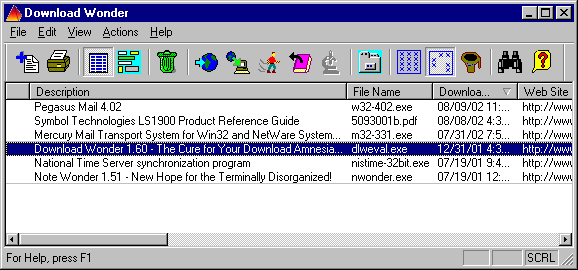
From Download Wonder's Table View, you can view a permanent record of all the files you've downloaded,
where you got them from and where you put them on your computer. You
can even select which columns you wish to include and sort the table by
any column. And to see more information about a specific entry, either scroll the table horizontally, or double-click to
view/edit the information
as shown in the Edit Download Information screen below.
Download Wonder's
Edit Download Information Screen
Modify your download information quickly and easily. Why you can even move your file to
another folder from within Download Wonder.
Download Wonder's
File Download Screen
As soon as you begin a download from within your browser, this screen
immediately pops up to display the progress of the download and allow
you to enter information about the file you're downloading -- as much
or as little as you like.


 From Download Wonder's Table View, you can view a permanent record of all the files you've downloaded,
where you got them from and where you put them on your computer. You
can even select which columns you wish to include and sort the table by
any column. And to see more information about a specific entry, either scroll the table horizontally, or double-click to
view/edit the information
as shown in the Edit Download Information screen below.
From Download Wonder's Table View, you can view a permanent record of all the files you've downloaded,
where you got them from and where you put them on your computer. You
can even select which columns you wish to include and sort the table by
any column. And to see more information about a specific entry, either scroll the table horizontally, or double-click to
view/edit the information
as shown in the Edit Download Information screen below.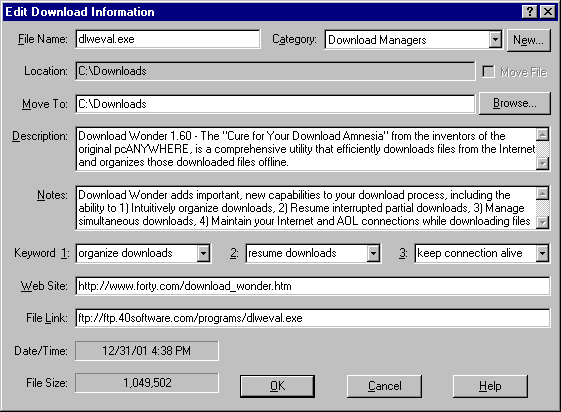 Modify your download information quickly and easily. Why you can even move your file to
another folder from within Download Wonder.
Modify your download information quickly and easily. Why you can even move your file to
another folder from within Download Wonder. As soon as you begin a download from within your browser, this screen
immediately pops up to display the progress of the download and allow
you to enter information about the file you're downloading -- as much
or as little as you like.
As soon as you begin a download from within your browser, this screen
immediately pops up to display the progress of the download and allow
you to enter information about the file you're downloading -- as much
or as little as you like.